Authentication failures are a specific kind of frustrating. The application is running. The network is up. The credentials are correct. And yet: access denied. The system is doing exactly what it was told to do — which is precisely the problem.
The customer reported a 383ms latency on authentication. There were no errors of any kind in the logs.
Not a single exception. Not a retry. Not a warning. Just requests that took 383 milliseconds longer than they should have, with nothing in the application layer to explain why.
This is a story about Kerberos, a Service Principal Name that didn’t match, and what happens when an authentication protocol that was designed to be airtight decides to be airtight about the wrong thing.
How Kerberos Is Supposed to Work
Before getting into what goes wrong, it helps to understand what goes right.
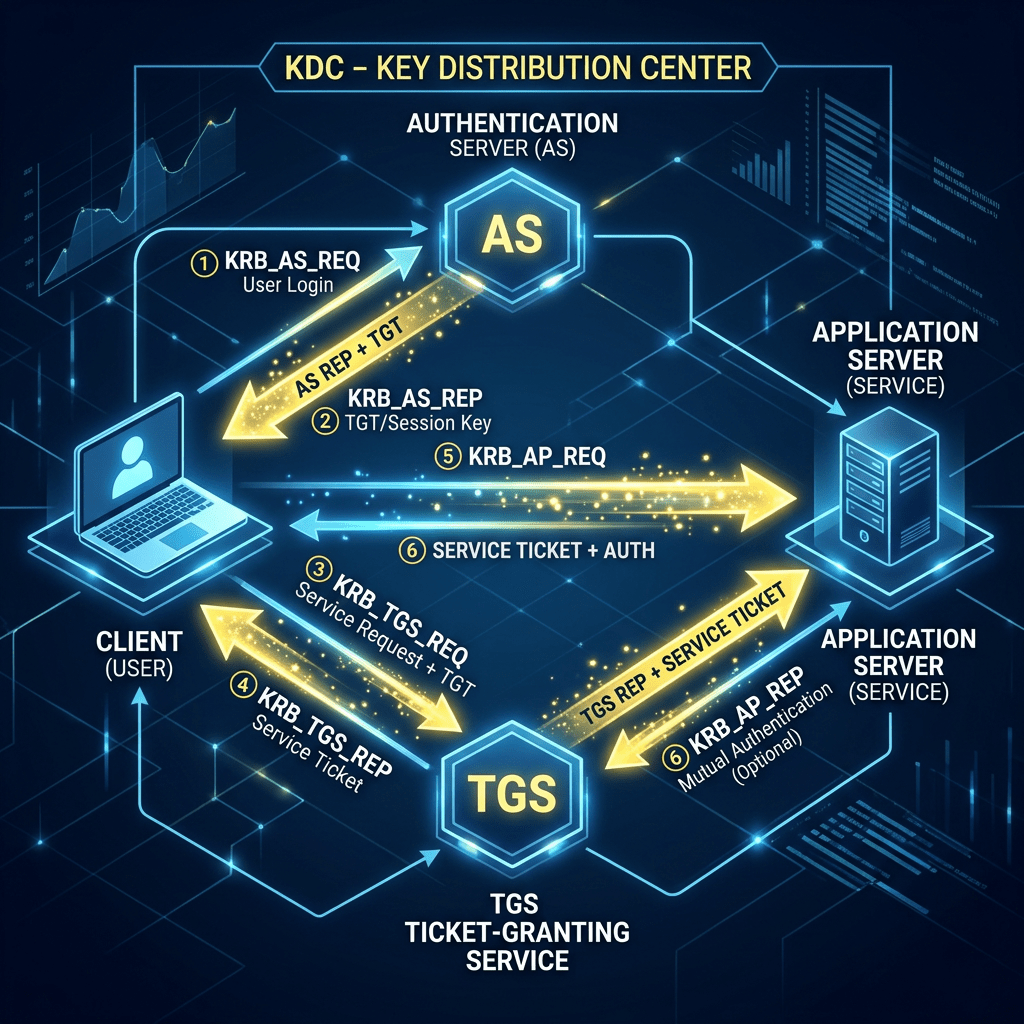
Kerberos is a ticket-based authentication protocol. Rather than sending credentials directly to the service you want to reach, you ask a trusted third party — the Key Distribution Center, or KDC, which in Windows environments is the domain controller — to vouch for you. The KDC issues you a ticket. You present the ticket to the service. The service trusts the ticket because it trusts the KDC. Nobody’s raw password ever crosses the wire.
[DIAGRAM: Normal Kerberos auth flow]
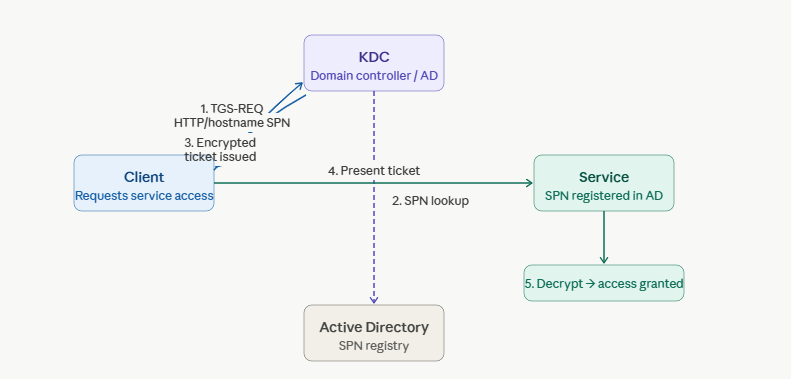
The mechanism that makes this work is the Service Principal Name, the SPN. An SPN is a unique identifier registered in Active Directory that maps a service to the account running it. When a client wants to talk to a service, it asks the KDC for a ticket for that specific SPN. The KDC looks up the SPN, encrypts the ticket with the service account’s secret key, and hands it back. The service decrypts the ticket using the same key. If it decrypts successfully, authentication passes.
The SPN is the handshake. Get it wrong and the whole chain breaks.
What an SPN Looks Like
An SPN follows a specific format:
serviceclass/hostname:port
For a web application running on a host called appserver01 in the domain contoso.com, the SPN might look like:
HTTP/appserver01.contoso.com
Or for a named port:
HTTP/appserver01.contoso.com:8080
The SPN must be registered in Active Directory against the account the service runs under. It must match — exactly — what the client constructs when requesting a ticket. The client builds its SPN request from the URL it’s connecting to. If anything in that chain is off, the KDC either can’t find the SPN, issues a ticket the service can’t decrypt, or issues a ticket for the wrong principal entirely.
The Mismatch
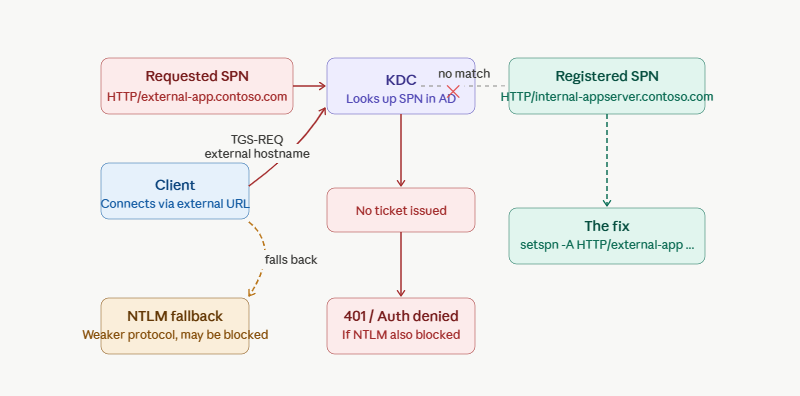
In this case, the application was running on Azure App Service behind a load balancer, fronted by a custom hostname. The client was constructing its Kerberos ticket request using the externally-facing hostname. The SPN registered in Active Directory was tied to the internal hostname of the backend service account.
[DIAGRAM: SPN mismatch — what the client requests vs. what’s registered]
These are not the same thing.
The client asks for a ticket for HTTP/external-app.contoso.com. Active Directory has HTTP/internal-appserver.contoso.com registered. The KDC cannot find a matching SPN for the external hostname. At this point, depending on the client configuration and the authentication negotiation, one of two things happens:
Option A: The authentication fails outright. The client gets a 401 and — if it’s a browser or a smart client — may fall back to NTLM. The user might never know Kerberos was even attempted.
Option B: The KDC issues a ticket, but for the wrong SPN — finding a partial or incorrect match. The service attempts to decrypt it with its key. It fails. Authentication denied, with a cryptic error that tells you nothing about why.
Both paths produce the same visible symptom: the user cannot authenticate. The path they took to get there is invisible unless you’re reading the wire.
Where the 383ms Came From
Here is why the logs were clean: the request didn’t fail. It just took a detour.
When Kerberos authentication fails, a smart client doesn’t give up, it falls back to NTLM and tries again. NTLM is an older challenge-response protocol, and unlike Kerberos it doesn’t require a ticket from a domain controller. It negotiates directly between client and server in three steps:
- The client sends a NEGOTIATE message advertising its NTLM capabilities.
- The server responds with a CHALLENGE — a random nonce the client must sign with the user’s credentials.
- The client sends an AUTHENTICATE message containing the signed response.
All three steps complete successfully. The user gets in. No error is logged anywhere because, from the application’s perspective, authentication succeeded. The 383ms was the cost of that round trip Kerberos attempted, Kerberos failed silently, NTLM negotiated, NTLM succeeded. Three extra network exchanges the application didn’t know were happening.
This is what makes NTLM fallback genuinely dangerous as a failure mode. It doesn’t surface as an error. It surfaces as latency, if it surfaces at all. In a less performance-sensitive application it might never surface, the fallback would complete, the user would authenticate, and the SPN mismatch would sit undetected indefinitely. The 383ms was the only evidence that anything was wrong.
Why the Network Trace Was the Only Way to See It
This is the class of problem where application logs are essentially useless. The application sees a failed authentication and logs a 401. The event log might show a Kerberos error code, if you know where to look and you have the right auditing enabled. But the actual negotiation — what SPN was requested, what the KDC responded with, whether the ticket was issued and then rejected, that happens at the network layer, below where most logging operates.
The packet capture told the story. In the Kerberos AS-REQ and TGS-REQ exchanges, you can see exactly what SPN the client requested. In the KDC response, you can see whether a ticket was issued and for what principal. The mismatch was visible in the trace within minutes of opening the capture, a ticket request for the external hostname, silence from the KDC, and then the client falling back to NTLM negotiation.
That fallback is its own problem. NTLM is an older, weaker protocol. Depending on the environment’s security posture, NTLM may be restricted or disabled entirely, which turns an authentication degradation into an authentication failure. In this case the environment had NTLM restrictions in place, which is why the fallback didn’t silently paper over the Kerberos failure, it just produced a different failure.
The Fix
Register the correct SPN. In this case that meant adding the external hostname to the SPN registrations for the service account in Active Directory:
setspn -A HTTP/external-app.contoso.com domain\serviceaccount
Once the SPN was registered, the KDC could find it, issue the correct ticket, and the service could decrypt it. Authentication worked. The NTLM fallback stopped happening. The 401 loop ended.
The fix took less than a minute to execute. The diagnosis took considerably longer — not because the problem was subtle once you could see it, but because knowing where to look required understanding the full Kerberos flow end to end.
This Is More Common on Azure App Service Than You’d Think
The case above involved inbound authentication, a client connecting to an App Service app that was doing Kerberos. But there’s a second scenario that’s arguably more common, and harder to catch: outbound Kerberos, where App Service is the client.
When an application running on App Service connects back to on-premises resources over a VPN, ExpressRoute, or App Service VNet Integration, SQL Server with Windows Authentication, internal file shares, APIs running under IIS with Windows Auth, the Kerberos negotiation happens on that internal hop. The App Service worker is the client in that exchange. It needs a valid SPN to reach the backend service, and if that SPN isn’t registered correctly in Active Directory, the connection fails.
SPN mismatches in this direction are particularly hard to diagnose because the failure is on the outbound leg of a request, not the inbound. The user successfully authenticates to the App Service app. The app successfully receives the request. Then it makes a call to a backend resource and that call silently fails, a database connection that won’t open, an API call that returns 401, a file share that refuses access. From the user’s perspective, the app is broken. From the app’s perspective, a downstream dependency is broken. The Kerberos failure is buried one hop further back than most people look.
The packet capture is, again, the only reliable way to see it. The outbound TGS-REQ from the App Service worker will show exactly what SPN it requested for the backend service, and the KDC response, or lack of one, will tell you immediately whether the registration exists.
What This Case Teaches
SPNs are not self-maintaining. When you add a load balancer, change a hostname, move to a custom domain, or put a reverse proxy in front of a service, the SPN registrations don’t update automatically. The infrastructure changed; Active Directory doesn’t know that. This is a gap that exists quietly until the first Kerberos authentication attempt hits it.
NTLM fallback is a canary, not a solution. If you have Kerberos configured and clients are silently falling back to NTLM, something is wrong with your SPN setup. NTLM succeeding is not evidence that Kerberos is working, it’s evidence that Kerberos failed gracefully enough that the client tried something else. In security-hardened environments, that graceful fallback eventually gets removed. At that point, a latent SPN mismatch becomes a visible outage.
Authentication failures need wire-level visibility. Application logs tell you that authentication failed. They do not tell you why, at the protocol level. Kerberos errors in event logs are specific enough to be useful if you know the error codes, but the full picture, what was requested, what the KDC returned, what the client did next, is in the packets. If you’re diagnosing Kerberos issues without a network trace, you’re working with partial information.
The SPN was wrong. Everything else was fine. That was the whole problem.
Christopher Corder is a Senior Azure Technical Advisor at Microsoft specializing in Azure App Service performance engineering, diagnostics, and root cause analysis. He writes about the cases that look complicated until they aren’t — and the ones that look simple until they are.

