
41 Zombie Domains and a 10.7GB Memory Dump: Inside a FileSystemWatcher Storm
Some cases arrive already on fire. This was one of them.
The customer was a customer running a .NET application on Azure App Service. The application was recycling. Not occasionally, continuously. And it was leaking memory at a rate that had produced a memory dump just shy of 11 gigabytes. When you’re handed a 10.7GB dump and told to find out what went wrong, you already know this isn’t going to be a simple afternoon.
What we found was a cascade. Not one problem, a chain reaction, each failure feeding the next, until the process had accumulated 41 zombie AppDomains and the kind of resource profile that makes infrastructure teams reach for the phone.
What Is an FCN Storm
Before getting into what happened, it helps to understand the mechanism.
FileChangeNotification — FCN — is how ASP.NET monitors the file system for changes that should trigger an application restart. Drop a new DLL in the bin directory, modify a config file, add or remove something from the application folder, ASP.NET sees it, flags it, and recycles the AppDomain so the changes take effect.
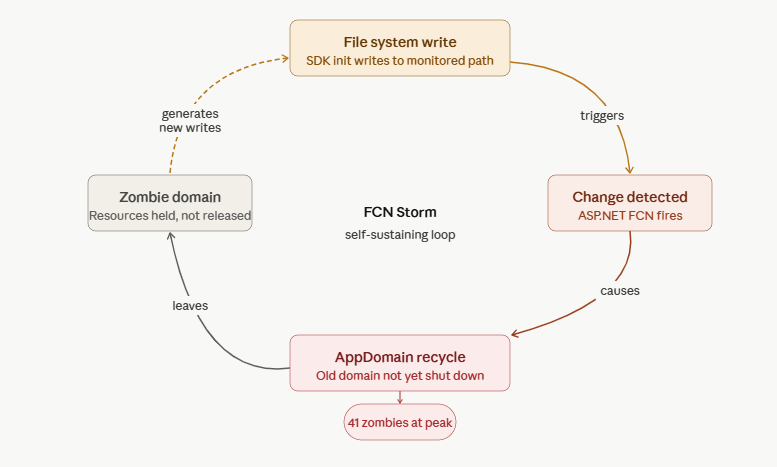
This is useful and intentional behavior. It becomes a problem when the file system events arrive faster than the application can process them, or when a restart itself triggers more file system events, which trigger more restarts, which trigger more events. That’s an FCN storm, a feedback loop where the restart mechanism becomes the source of the instability.
In a storm, AppDomains don’t just get replaced. They get replaced before they’ve had time to shut down cleanly. The old domain lingers — a zombie — holding references it was never given the chance to release. Add enough recycles fast enough and you don’t have one application. You have 41 versions of it stacked in memory, each one partially alive, none of them in a state to do any work.
The Dump
10.7 gigabytes is a significant dump. It is also, in its own way, a gift, there is a lot of evidence to work with.
Working through it with WinDbg, SOS, and MEX, the picture came into focus. The zombie domain count confirmed the storm pattern immediately. 41 AppDomains don’t accumulate by accident. Each one represented a recycle that happened before its predecessor had wound down.
But the storm alone didn’t account for the full memory profile. The domains were leaking. Across all 41, the same names kept appearing: StackExchange.Redis, Harness, NewRelic. Three separate SDKs, each one holding resources that should have been released when the AppDomain was torn down, and weren’t.
This is a known failure mode for managed SDKs in AppDomain recycle scenarios. When a recycle happens cleanly, the framework gives the domain time to shut down, event handlers get unregistered, connections get closed, threads get signaled to exit. When the recycle happens mid-storm, that shutdown sequence either doesn’t run or doesn’t complete. Static references, background threads, connection pool entries, they all remain attached to the zombie domain. The garbage collector cannot collect what is still reachable.
Each of the three SDKs was contributing. StackExchange.Redis was holding connection multiplexers. Harness was holding SDK initialization state. NewRelic’s agent threads were still running, attached to domains that had been logically replaced. Multiply each of those by 41 domains and the memory number starts making sense.
What Started the Storm
Tracing the FCN storm back to its origin required looking at what was changing on the file system at the frequency needed to sustain a recycle loop.
The application had a combination of factors working against it. The deployment structure and the way certain SDK components were writing state to disk during initialization were generating file system events that ASP.NET’s monitoring interpreted as change signals. The first recycle generated writes. The writes generated another recycle. The loop was self-sustaining once it started.
The 41 zombie domains were the evidence. Each one was a lap around the loop.
The Compounding Problem
What made this case particularly instructive is that none of the three SDK components ,Redis, Harness, NewRelic, were at fault in isolation. Each was behaving in a way that’s reasonable under normal conditions. They initialize state, they maintain connections, they run background threads. That is what they are supposed to do.
The storm created conditions that none of them were designed to handle cleanly. A well-behaved SDK in a clean shutdown is not the same as a well-behaved SDK in a mid-storm eviction. The assumption that the AppDomain lifecycle will proceed normally is baked into how most of these libraries are written. When that assumption breaks, the resources they hold don’t get cleaned up, because the code path that cleans them up was never reached.
Three SDKs, each holding on because the exit never came.
Remediation
Addressing this required working at multiple levels.
The FCN storm itself needed to be stopped. That meant examining the file system activity during startup, identifying the writes that were generating change notifications, and either suppressing the notifications for those paths or restructuring the behavior generating them. FCN sensitivity thresholds and the fcnMode configuration in web.config are levers here, but they treat the symptom. The writes needed to stop, or be moved out of monitored paths.
For the SDK resource leaks, the pattern is to implement IRegisteredObject or AppDomain.DomainUnload handlers that give each SDK an explicit signal to shut down. This is defensive programming for AppDomain-hosted applications, you cannot rely on the framework to deliver a clean shutdown when you’re in a recycle storm, so you give the SDK the shutdown signal yourself.
The zombie domain accumulation resolves once the storm stops. They don’t persist indefinitely, once the process stabilizes, the GC can collect them. The priority is stopping the loop.
What I Take From This
Cases like these cases are what happens when multiple independent systems interact under stress in ways none of them were individually designed for. You can read the StackExchange.Redis documentation and find nothing wrong. You can read the Harness SDK documentation and find nothing wrong. You can look at the NewRelic agent behavior and find nothing wrong. The failure mode isn’t in any one component. It’s in the interaction.
This is also a case where the memory dump was indispensable. Without it, you have a recycling application and a memory number. With it, you have 41 zombie domains, three SDKs with identifiable resource profiles, and enough evidence to reconstruct the sequence of events. The dump told the story. The work was learning to read it.
The FCN storm was the ignition. The zombie domains were the evidence. The SDK leaks were the fuel that kept it burning.
Find the ignition source. Everything else follows.
Christopher Corder is a Senior Azure Technical Advisor at Microsoft specializing in Azure App Service performance engineering, diagnostics, and root cause analysis. He writes about the cases that look complicated until they aren’t — and the ones that look simple until they are.

